

Правила оформления статей
Уважаемые авторы научного журнала «Информационно-управляющие системы», все соответствующие тематике журнала статьи, которые поступают в редакцию, проходят обязательное рецензирование.
Редакция оставляет за собой право отказать в рассмотрении статьи в случае ее несоответствия тематике журнала и нарушения авторами правил публикационной этики. Перед отправкой рукописи в редакцию проверьте ее в системе Антиплагиат: текст статьи должен быть оригинальным, цитирование оформлено корректно (кавычки и ссылка на источник).
Статьи должны содержать изложение новых научных результатов и ссылки на новейшие результаты российских и зарубежных коллег, опубликованные в периодике. Предоставляемые в редакцию тексты статей и сопроводительные материалы должны соответствовать техническим требованиям нашей редакции.
Объем и основные элементы статьи
Объем статьи (текст, таблицы, иллюстрации и библиография) не должен превышать эквивалента в 25 страниц, напечатанных на бумаге формата А4 на одной стороне через 1,5 интервала шрифтом Times New Roman размером 13 пт.; поля: слева три сантиметра, остальные два.
Обязательными элементами оформления текста являются:
- УДК;
- научная специальность ВАК (по новой номенклатуре);
- шапка статьи;
- название;
- аннотация (при написании аннотации не используйте аббревиатур и не делайте ссылок на источники в списке литературы);
- ключевые слова;
- введение, основная часть (с тематическими заголовками, раскрывающими тему статьи, но не повторяющими ее названия), заключение;
- список литературы.
Перечень предоставляемых в редакцию материалов
В редакцию предоставляются через электронную редакцию на сайте журнала:
- в виде файла Microsoft Word, *docx , шрифт Times New Roman (тексты программ — Pragmatica BookC или другой, отличающийся от основного), с пронумерованными страницами полный текст статьи со всеми элементами, а именно: одним блоком на русском языке - шапка, аннотация, ключевые слова, вторым блоком на английском языке - шапка, аннотация, ключевые слова; расположенные в соответствующих местах в тексте, а не в конце рукописи рисунки и подрисуночные подписи к ним на русском и английском языках, а также таблицы с заголовками на русском и английском языках; Литература и References, и дополнительно — пронумерованные иллюстрации отдельными файлами, которые следует называть так: Рис1, Рис2..;
- в виде файла Microsoft Word, не используя аббревиатуры, сведения об авторе (скопируйте образец и подставьте свои сведения, не меняя формулировок): фамилия, имя, отчество, место работы, должность, ученое звание, учебное заведение и год его окончания, ученая степень и год защиты диссертации, количество публикаций, область научных интересов, адрес эл. почты, ORCID — эта информация по требованию ВАК публикуется в журнале; домашний и служебный адреса и телефоны, факс, номер мобильного телефона — информация для редакции, которая не публикуется. Сведения о каждом из соавторов предоставляйте отдельным файлом, называя его так: PetrovIG.docx;
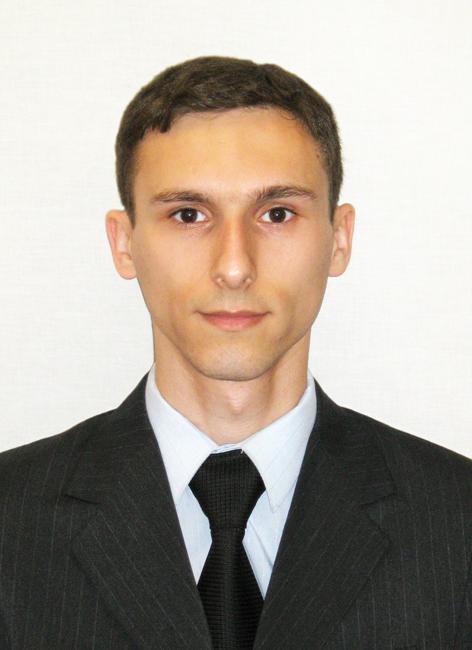
- фото авторов, которое требуется не для архива, а для публикации в журнале, поэтому необходимо строго соблюдать технические и композиционные требования: анфас, в темной одежде на светлом фоне, должны быть видны плечи и грудь, высокая степень четкости изображения без теней и отблесков на лице. Фото можно представить в электронном виде в формате tiff, png или jpeg с разрешением не менее 300 dpi при размере 40×55 мм (см. образец фото). Фото каждого автора предоставляйте отдельным файлом, называя его так: PetrovIG.tiff;
- экспортное и экспертное заключения о разрешении публикации материалов статьи в открытой печати (отсканировать документы нужно с высоким разрешением - не менее 300 dpi).
Шапка статьи
- Название статьи должно быть кратким, но информативным. В названии недопустимо использование сокращений, кроме самых общепринятых (РАН, РФ, САПР и т. п.).
- Обязательными элементами оформления шапки статьи являются: индекс УДК, заглавие, инициалы и фамилия автора (авторов), ученая степень, звание (при отсутствии — должность), orcid, эл. адрес, полное название организации с полным почтовым адресом, аннотация и ключевые слова (см. образец шапки статьи). При написании аннотации не используйте аббревиатур и не делайте ссылок на источники в списке литературы.
Структура, содержание и объем аннотации
Аннотация (авторское резюме, реферат, abstract) является кратким резюме большей по объему работы, имеющей научный характер, которое будет публиковаться в отрыве от основного текста и, следовательно, само по себе должно быть понятным.
Аннотация должна излагать существенные положения работы, и не должна содержать материал, который отсутствует в основной части публикации.
Объем аннотации – 200-250 слов.
Недопустимо использование аббревиатур, сокращений, условных обозначений и ссылок на номер публикации в списке литературы к статье
Аннотация должна быть структурированной: Введение (Intoduction): с постановкой проблемы: не более 5-6 строк, Цель исследования (Purpose): что сделать?, Методы (Methods): если авторы использовали оригинальные методы исследования, если же канонические, раздел опустить, Результаты (Results): самый объемный раздел: 12-15 строк. Здесь приводятся основные теоретические и экспериментальные результаты, фактические данные, обнаруженные взаимосвязи и закономерности. Исключите общие, абстрактные фразы типа "проанализированы методы", верным вариантом будет такой: "Анализ методов... показал, что..." и т. п., т. е. в этом разделе нужно описать конкретный научный результат. Практическая значимость (Practical relevance): если есть практическая значимость авторского результата. Обсуждение (Discussion): рекомендации, оценки, предложения, гипотезы, оставшиеся нерешенными проблемы и т. п.
!!! Текст аннотации должен быть лаконичным и четким, свободным от второстепенной информации, лишних вводных слов (например, «автор статьи рассматривает...», «в этой статье…»), общих и незначащих формулировок. Не используйте будущее и настоящее время, в аннотации описывается уже сделанная научная работа.
Текст должен быть связным, с использованием слов «следовательно», «более того», «например», «в результате» и т. д. («consequently», «moreover», «for example», «the benefits of this study», «as a result» etc.), предложения должны логично вытекать одно из другого.
При переводе необходимо использовать активный, а не пассивный залог, т. е. «The study tested», но не «It was tested in this study» (частая ошибка российских аннотаций).
Примеры правильно оформленных аннотаций: образец..
Примеры, как не надо писать аннотацию, приведены на сайте издательства Emerald http://www.emeraldinsight.com/authors/guides/write/abstracts.htm?part=3.
На сайте издательства также приведены примеры хороших аннотаций для различных типов статей (обзоры, научные статьи, концептуальные статьи, практические статьи): http://www.emeraldinsight.com/authors/guides/write/abstracts.htm?part=2.
Набор текста
- Используйте шрифт Times New Roman, 13 кегль, через 1,5 интервала. Для рисунков кегль не менее 8, не более 10.
- Абзацы начинайте с красной строки. Не делайте дополнительных интервалов между абзацами.
- При наборе формул на рисунках, в отдельных строках и внутри текста символы, обозначаемые латинскими буквами, набираются светлым нежирным курсивом (Gt, tn, g и др.), русскими и греческими — прямым (Ц, µ, α и др.).
- Числа подобия (Ar, Re и др.), тригонометрические функции (sin, tg и др.), условные математические сокращения (min, exp, const, opt, lg и др.), знаки дифференциала и производной (∫, d), русские индексы (Uвх, Fк.з2), знаки препинания, скобки, цифры набирайте светлым нежирным прямым шрифтом.
- Обозначения единиц физических величин даются в русской транскрипции (А=8 Дж, L=15 дБ, Е=700 кВт•ч и др.)
- Векторы и матрицы набирайте прямым полужирным шрифтом (n, M).
- Никогда не используйте подчеркивание для выделения текста.
- Предельно ограничивайте количество выделений в тексте (курсив, полужирный, др.), полностью исключив эмоциональные выделения.
- Таблицы делайте закрытыми (ограниченными со всех четырех сторон линейками).
Набор формул
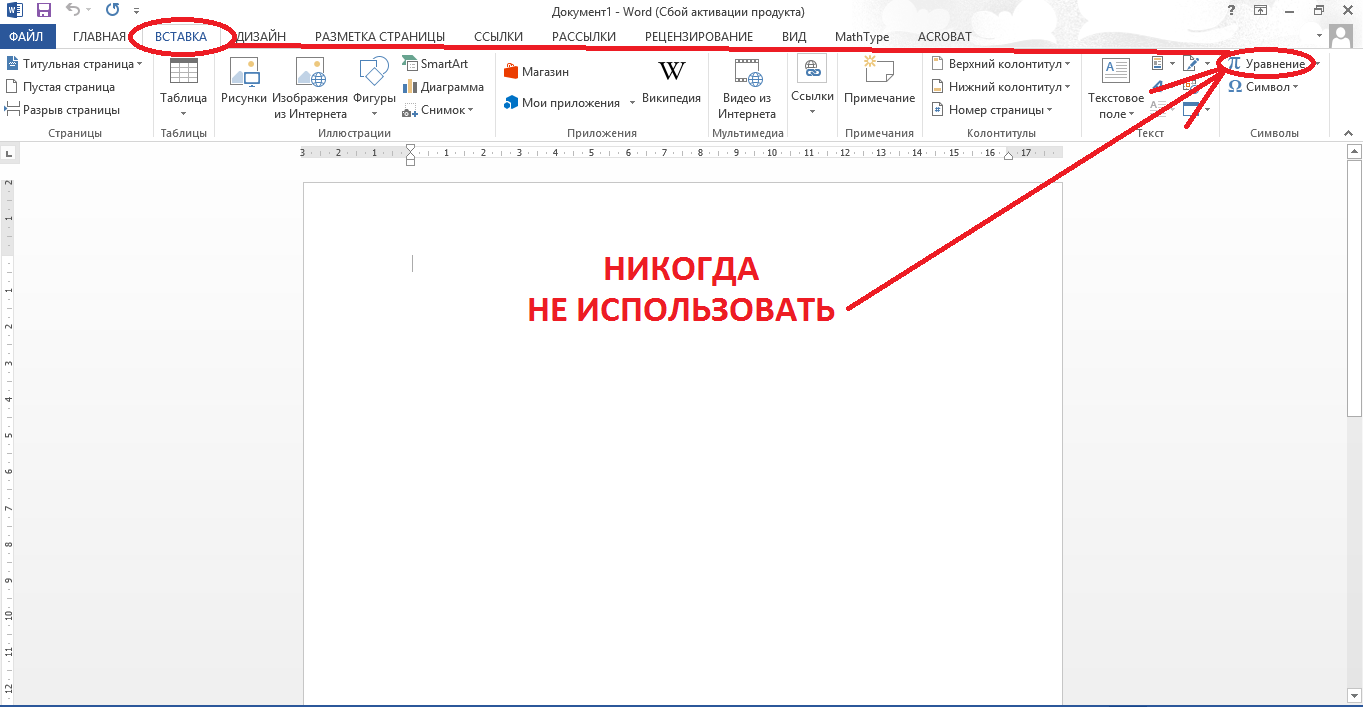
- Не используйте Конструктор для набора формул, этот ресурс предназначен исключительно для внутреннего использования в Word. При конвертации в процессе верстки формулы, набранные в Конструкторе, искажаются.
- В текстовых строках, в том случае, если средства Word позволяют, простые формулы и символы набирайте в Word, не используя формульный редактор Mathtype или Equation, если на клавиатуре нет нужного символа, выбирайте на панели «Вставка», затем «Символ», затем ищите нужный символ в одном из разделов (Symbol, Symath, различные Euclid).
- Стоящие в отдельной строке формулы могут быть набраны любыми средствами (Word, Mathtype (версия не выше 7.4.; более поздние версии сохраняют формулы в виде картинки, что не позволяет их редактировать) или Equation), кроме Конструктора.
- Символы с «крышками» всегда набирайте в формульном редакторе Mathtype (версия не выше 7.4) или Equation.
- Для набора формул, которые нельзя набрать в Word, используйте формульный редактор Mathtype (версия не выше 7.4) или Equation:
- при наборе формул в формульном редакторе знаки препинания (. , ;) в конце формулы набирайте вместе с формулой без пробела внутри редактора Mathtype или Equation;
- для установки размера шрифта никогда не пользуйтесь вкладкой Other... , используйте заводские установки редактора;
- не подгоняйте размер символов в формулах под размер шрифта в тексте статьи, не растягивайте и не сжимайте мышью формулы, вставленные в текст;
- векторы и матрицы набирайте прямым полужирным шрифтом: – для латинских п/ж (B, F, b, f): Ctrl+Shift+B, – для греческих п/ж (β α F Θ Ψ): Style → Other → bold (Стиль — Другой — Жирный);
- для набора греческих и специальных символов используйте только символы на панели инструментов, не используйте символы из меню «Правка -> Вставить символ»;
- шрифт Cambria запрещён!;
- номер формулы набирайте в тексте (не в формульном редакторе, не в таблице!), заключается в круглые скобки и выравнивается по правому краю печатного листа с помощью клавиши TAB;
- выравнивайте формулу по центру;
- в формулах не отделяйте пробелами знаки: + = - {} [] ();
- при наборе громоздких формул в формульном редакторе следует делать переносы, учитывая ширину колонки (83 мм.).
- Не используйте два редактора для набора одной формулы (часть формулы просто в Word, например, скобки, а часть в Mathtype или Equation).
Подготовка иллюстраций
- Рисунки, графики, диаграммы, блок-схемы предоставляйте в виде отдельных исходных файлов, поддающихся редактированию, используя векторные программы: Visio (*.vsd, *.vsdx); PowerPoint (.pptx); Excel (*.xls); Word (*.docx); Adobe Illustrator (*.ai); Coreldraw (*.cdr, версия не выше 15); AutoCad, Matlab (экспорт в EMF, PDF, SVG, EPS, WMF); Компас (экспорт в PDF), Inkscape (экспорт в PDF, SVG), веб-портал DRAW.IO (экспорт в PDF); Figma (экспорт в PDF, SVG); в Python скрипте можно добавить вот такую настройку, и тогда графики будут читаемо выгружаться в PDF: import matplotlib as mpl mpl.rcParams['pdf.fonttype'] = 42 mpl.rcParams['ps.fonttype'] = 42
- Если редактор, в котором Вы изготавливаете рисунок, не позволяет сохранить в векторном формате, используйте функцию экспорта (только по отношению к исходному варианту рисунка, к уже сохраненному в растровом формате (tif , jpg, png, psd) рисунку применение данной функции не дает желаемого результата), например, в формат *.pdf, *.ai, *.eps, *.emf, *.svg. При экспорте файлов не переводить текст в кривые!
- Если при изготовлении рисунка Вы используете стрелочки, руководствуйтесь принципом единообразия.
- При наличии надписей на рисунке используйте тот же шрифт, что и в основном тексте (Times New Roman), размер шрифта не более 10 pt, но не менее 8 pt.
- Фотографии предоставляйте в формате *.tif, *.png, *.jpg с максимальным разрешением (не менее 300 pixels/inch или 800 pixels по меньшей стороне).
- Обязательно составляйте подрисуночные подписи на русском и английском языках и располагайте их в тексте статьи в соответствующем месте.
Список литературы
Пристатейные списки литературы по преимуществу должны состоять из ссылок на научную рецензируемую (WoS, SCOPUS, Перечень ВАК) российскую и зарубежную периодику за последние 5 лет (20-35 ссылок, для обзоров – 45-150). Самоцитирование не должно превышать 20%. Недопустимы ссылки на учебные и справочные издания.
Список литературы составляйте по порядку появления ссылок в тексте статьи ( [1], [2], [3-7] и т. д.) и оформляйте двумя отдельными блоками: первый (Литература) – на языках оригиналов и второй (References) – на латинице (частично транслитерация, частично перевод) по образцам lit.dot: копируете нужный образец (например, «журнальная статья»), вставляете в свой список, ниже, глядя на образец, описываете свой источник, стираете образец, сохраняете файл и т. д.
Если описываемая публикация имеет цифровой идентификатор объекта DOI, его обязательно надо указывать в конце описания ссылки единой записью без пробелов:
doi:10.1134/S1023193508080077
Не делайте в ссылках произвольных переводов и сокращений названий источников. Это может привести к потере связки с источником, так как в сокращенном виде название может быть не идентифицировано. Обращайте на это внимание коллег, цитирующих ваши публикации. Например, составляя ссылки на наши публикации, название журнала «Информационно-управляющие системы» авторы описали таким образом: «Inf. Upravlen. Sist.» и «ИУС» – ссылки не были зачтены ни авторам публикации, ни нашему журналу, т. к. такие журналы не существует.